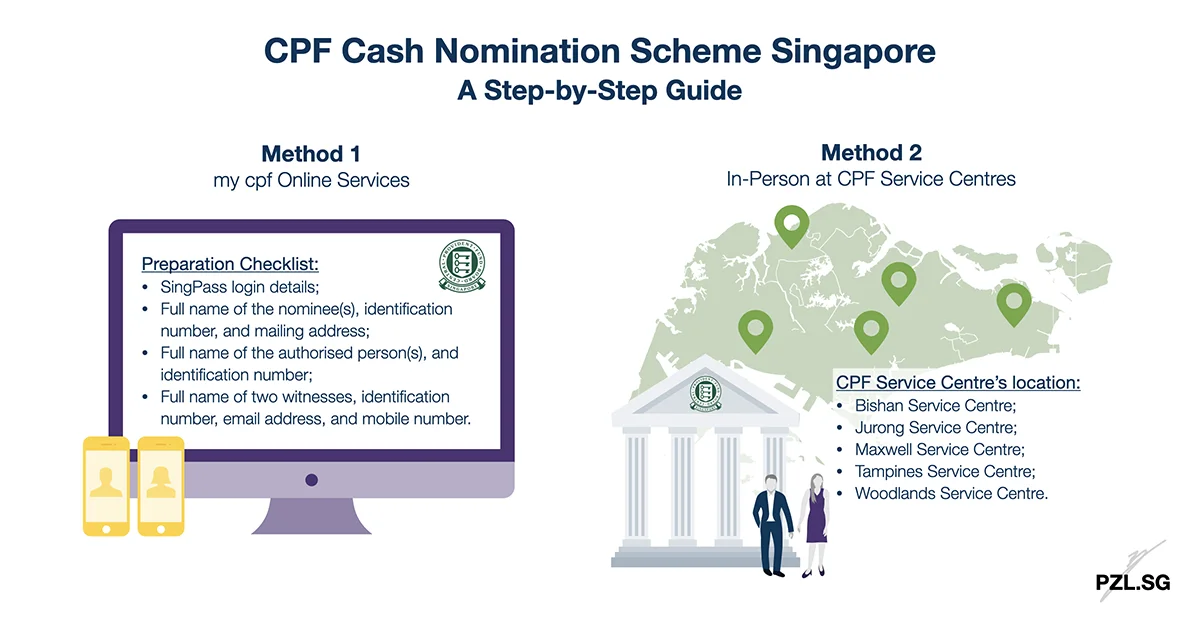
CPF cash nomination is the default option to distribute your CPF monies to your beneficiaries after your death. Correspondingly, your nominee(s) will receive your CPF monies in cash via cheque or GIRO. With this purpose in mind, let’s go through two methods to make a CPF cash nomination in Singapore.
Table of Contents:
- Method 1 – my cpf Online Services
- Method 2 – In-Person at CPF Service Centres
- Other Points to Note
- Conclusion
One Minute Summary:
- My cpf Online Services is a convenient way for you to make a CPF cash nomination online.
- If you have questions or prefer to keep your nomination private, then visit one of the five CPF Service Centres to make your CPF nomination.
- On the whole, a CPF nomination is the only way to distribute your CPF monies according to your wishes upon your demise.
Part 1: Method 1 – my cpf Online Services
As a matter of fact, you can submit a CPF cash nomination online! For one thing, this eliminates the pain of filling up the form from scratch when you make a mistake.
Part 1.1: Preparation Checklist
Before we begin, make sure that you have the following information at hand:
- SingPass login details;
- Full name of the nominee(s), identification number, and mailing address;
- Full name of the authorised person(s), and identification number;
- Full name of two witnesses, identification number, email address, and mobile number.
Part 1.2: Role of the two Witnesses
By and large, you need the endorsement from two witnesses to complete the online nomination. To clarify, they help to check and confirm your intention to make the CPF nomination. In detail, these two persons
- must be at least 21 years old;
- of sound mind;
- not any of the nominee(s); and
- hold valid SingPass accounts.
After you have submitted the online nomination, both witnesses must submit their declaration within seven calendar days. It must be remembered that your CPF cash nomination is valid only after the witnesses have submitted their declaration.
Part 1.3: Step-by-Step Guide
Navigation
- Login to CPF website (via either SingPass Mobile or Password Login).
- From the left navigation bar, click “My Requests”.
- Next, look for “CPF Nomination” from the expandable tab.
- Expand that tab and click “Make a CPF Nomination”.
- Read the overview and check “I have read and accepted the Important Notes above”.
- Click “Start”.
Section 1: Member’s and Nominee’s Particulars
- Under the section “Add Nominee’s Particulars”, complete the respective fields. That is, Name of Nominee, Identification Number, Relationship, Share (%), and Email Address.
- Once you are done, click “Add this Nominee”. Thereafter, you will see the nominee’s details in the Nominee List (above the section Add Nominee’s Particulars).
- After adding all the nominee(s), check that the total share adds up to 100%. Then click “Next”.
Section 2: Instruction to Disclose my CPF Information
In this section, you may choose to disclose your CPF account information to an authorised person. For this purpose, there are two options:
- Option 1: Disclose the information to all your nominee(s). In this case, check the box, “all the nominee(s) specified in Section 1”. Thereafter, click “Next” and a popup will appear. Click “OK” to continue.
- Option 2: Disclose the information to a specific authorised person. In this situation, check the box, “the authorised person(s) stated below”. Thereafter, complete the respective fields. That is, Name of Authorised Person, Identification Number, and Relationship. After you are done, click “Add this Authorised Person”. In like manner, you will see the authorised person’s details in the Authorised Person List (above the section Add Authorised Person’s Particulars). When you are done, click “Next”.
Section 3: Witnesses’ Particulars
In this section, complete the following fields. That is, Name of Witness, Identification Number, Relationship, and contact details (either email address, or a Singapore-registered mobile number). It is important to realise the accuracy of the contact details. Otherwise, there is no way for your witnesses to complete their declaration. When you are done, click “Next”.
Summary Page
At this point, we have almost completed the CPF cash nomination. Accordingly, check through all the information to ensure that everything is accurate. Thereafter, tick the CAPTCHA verification checkbox and click “Submit” to proceed.
Part 2: Method 2 – In-Person at CPF Service Centres
On the other hand, you may choose to complete the cash nomination in person. For this purpose, you may make an appointment to visit any of the five CPF Service Centres in Singapore.
- Bishan Service Centre;
- Jurong Service Centre;
- Maxwell Service Centre;
- Tampines Service Centre;
- Woodlands Service Centre.
Part 2.1: How to make an Appointment
- Visit Appointment@CPF.
- Read the terms and conditions. Then check “I have read and accepted the Terms and Conditions”. Click “Next” to continue.
- Enter your NRIC, and contact number. Thereafter, click “Next”.
- From the dropdown box, select the location that you wish to visit.
- In like manner, choose your preferred Date, and Time.
- In order to serve you better, describe your visit in the box “Purpose of Visit”. When you are done, click “Next”.
- Review your Appointment Details and make sure that the information are correct. Finally, click “Confirm”.
Part 2.2: Things to Bring
On the day of your appointment, you must bring along your original NRIC, or passport. While it is not mandatory, it will be good to carry a photocopy of your nominee(s)’s identification document. This is to ensure that you give the correct information to the customer service executive.
Part 3: Other Points to Note
Generally, the customer service executive will assume that you want to submit a CPF cash nomination. If that is not your intention, then inform them accordingly. For instance, you may prefer to submit
Of course, you may clarify any questions that you have with the executives at the CPF Service Centre. What’s more, the customer service executives can act as your witnesses for the nomination. Hence, you don’t need to ask two relatives or friends to tag along.
Part 4: Conclusion
All things considered, we cannot distribute CPF monies through a Will. Be that as it may, one of the most effective way to distribute your monies to your intended beneficiaries is to set up a CPF Nomination. Otherwise, your CPF monies will be distributed according to the Intestate Succession Act in Singapore.
If you will like to retain control and to ensure that your intended beneficiaries receive your monies, then make a CPF nomination. Meanwhile, you may also choose to distribute your CPF savings via an enhanced nomination scheme, or special needs savings scheme.
Checklist:
- Submit a CPF nomination today.
- Have you drafted your Will? Is it still relevant today?
- Conduct a comprehensive portfolio review today.
First Published: 30 October 2019
Last Updated: 28 January 2021


Leave a Reply